How to Use Original AI Music in a Practical Content Marketing Plan
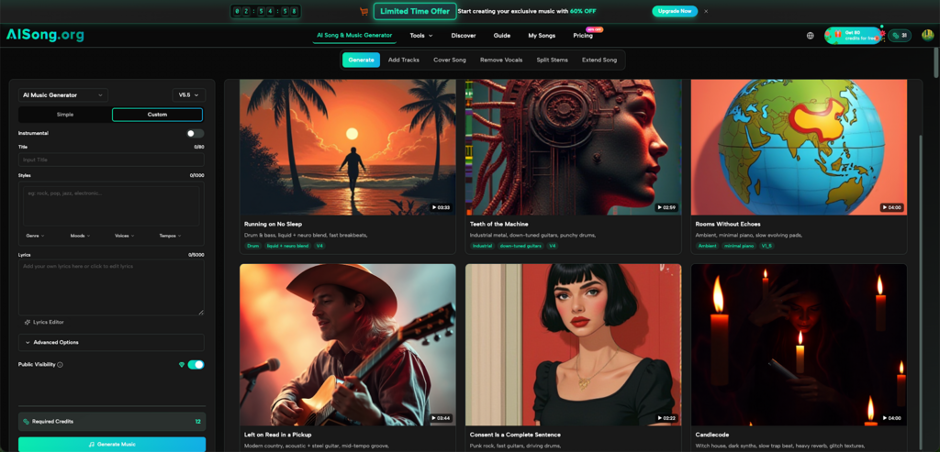
A blog post may be the starting point of a campaign, but it is rarely the final format. The same idea can become a YouTube tutorial, a short social video, a podcast discussion, or a webinar clip. Each version needs audio that supports the message without making production more complicated. AI Song can turn a written idea or lyrics into music, giving content teams a way to create tracks for specific formats. This does not mean music will improve Google rankings by itself. It will not. The value is more practical: original audio can make repeated content easier to recognize, reduce the time spent searching for unrelated tracks, and help one content idea feel connected across several channels.
Where AI Music Fits Into SEO and Content Work
SEO brings people to useful pages, but many audiences also discover brands through video, podcasts, and social platforms. A written guide may rank in search, while its video version reaches viewers who prefer demonstrations. A podcast can explore the same topic through conversation. Short clips can bring attention back to the full page.
Music supports these formats rather than replacing the content. A short opening cue can make a tutorial series recognizable. A calm background track can help a screen recording feel less empty. A consistent podcast intro can tell listeners that a new episode has begun.
The important distinction is simple: music is not a ranking factor. It is a production and branding tool that may improve the quality and consistency of content surrounding the website.
Four Content Formats That Can Use Original Music
1. YouTube Tutorials
A tutorial usually needs a short opening, a clear spoken explanation, and perhaps a closing section. It does not need loud music throughout.
Create a brief track that establishes the mood, then lower or remove it when the teaching begins. For example, a digital marketing channel might use a light electronic opening for every analytics tutorial. The repeated cue helps viewers recognize the series.
Test the track on a phone speaker. If the music makes the presenter difficult to hear, it is not supporting the tutorial.
2. Short Social Videos
Short videos have little time to establish energy. The useful part of a track may need to begin immediately.
An AI Music Generator can create music from a description tied to the actual post. A small bakery might request a playful instrumental for quick decorating videos. A software company might choose a cleaner, faster sound for feature demonstrations.
Do not use the same full track for every clip. Select a section that matches the length and pacing of the video.
3. Podcasts and Interview Clips
A podcast can use original music at the beginning, between segments, and at the end. The music should be easy to recognize but short enough that regular listeners do not skip it.
For interview clips, a quieter instrumental may work beneath the first few seconds before fading out. Avoid strong vocals when someone is speaking.
Keep the same main sound across episodes. Small variations can be useful, but listeners should still recognize the series.
4. Webinars and Online Courses
Webinars often include a waiting screen, section breaks, and a final slide. These moments can use music without distracting from the educational content.
A calm track can play before the session starts. A shorter cue can mark the move from explanation to questions. For an online course, the same opening can connect several lessons.
The music does not need to fill every silent second. Strategic use usually feels more professional than constant background audio.
A Step-by-Step Workflow for One Content Series
1. Choose a Repeated Format
Do not begin by creating music for every page and channel. Select one content series that already publishes regularly.
Good options include weekly tips, product tutorials, interview clips, customer stories, or monthly webinars. A repeated format gives the team enough chances to test whether consistent music is useful.
2. Write a Short Audio Brief
The brief should explain the audience, content type, desired mood, and role of the music.
For example: “Create a clear, optimistic instrumental for short SEO tutorials aimed at small-business owners. Keep the opening direct, avoid dramatic drops, and leave room for narration.”
This is more useful than requesting “professional background music.” It gives the track a purpose and makes review easier.
3. Generate a Small Number of Options
Create two or three focused directions, not twenty unrelated tracks. Compare them with the actual video or podcast.
Ask whether the opening is fast enough, whether the mood matches the topic, and whether speech remains clear. Choose the option that supports the content, not the one that sounds most impressive alone.
4. Prepare the Versions You Actually Need
One track may need several practical versions: a short opening, a closing cue, and a quieter section for transitions.
AISong also offers a song extension feature when a useful musical direction needs to continue for a longer piece. Use related versions only where they make sense. A short social clip and a 40-minute webinar do not need identical arrangements.
Name each file clearly. “Tutorial Intro 8s” is more useful to an editor than “Final Track New 3.”
5. Measure the Production Result
Do not claim success because the music sounds polished. Review what changed in the workflow.
Did editors spend less time searching for tracks? Did the approval process become shorter? Did viewers begin to recognize the series? Did video completion or podcast retention change after the new opening was introduced?
These observations will not prove that music caused every result, but they can show whether the new process is worth continuing.
Common Mistakes to Avoid
Using Music Everywhere
Some content works better without a soundtrack. A detailed screen recording or serious interview may need silence during the main explanation. Use music where it improves structure or mood.
Choosing a Track Before Defining the Audience
Personal taste is not a strategy. A track that the editor loves may feel wrong for new business owners, students, or technical users. Begin with the audience and the job of the content.
Making the Intro Too Long
Regular viewers do not want to wait through a 25-second theme before every two-minute tutorial. Keep recurring openings short and useful.
Ignoring Rights and Platform Terms
Do not assume that all AI music services use the same rules. Check AISong’s current terms before publishing or monetizing a track. Keep a record of where the music came from and which project uses it.
Expecting Direct SEO Gains
Adding original music to a video does not automatically improve the linked page’s ranking. Focus on production quality, clear information, useful distribution, and audience response.
Conclusion
Original AI music can support content marketing when it solves a real production need. It can give tutorials a recognizable opening, connect podcast episodes, support social clips, and make webinar transitions feel more deliberate. It does not directly improve Google rankings, and it should never replace useful information or clear editing. The most effective approach is to start with one repeated content series, write a specific audio brief, generate only a few options, and measure whether the process becomes easier. Choose one format your team already publishes regularly and test a simple musical direction there before expanding it to other channels.